
Personalize a client: brand kit
Juls writes every plan, caption and reply suggestion from the client's brand profile. A few minutes here is the single biggest improvement you can make to what Juls drafts.
Before you start
The brand kit lives on the client's edit page:
- Open Clients (on the Personal plan, Business Settings).
- Open the client, then choose Edit.
- Go to the Personalization tab.
Only the workspace owner can edit a client. Team members see the client in read-only mode.
You can fill the profile three ways — from the website, from documents or by hand — and mix them: whatever the AI fills in stays editable until you save.
Start from the website
- Paste the client's website address.
- Select the analyze button. Juls browses the site and fills in the fields it can.
- Read what it wrote, correct it, then save.
Website analysis costs about 200 credits, charged only when the analysis succeeds.

Start from documents
Have a brand book, a company profile or a presentation? Upload it instead.
- Drag the files in, or select them. PDF, Word, PowerPoint, Excel, plain text, Markdown, HTML, OpenOffice files and images are accepted, up to 20 MB each.
- Run the AI analysis. The fields fill in from the documents.
- Review and save.
Document analysis costs about 44 credits, charged only when it succeeds, and each client can have two document analyses per credit period.
Fill it in by hand
The profile has four sections. You don't need every field — a few precise answers beat many vague ones.
The client's business
Mission, vision, core values, a short history, products or services, what makes them different, and strengths and weaknesses.
Objectives
Business objectives, marketing objectives, the role social media plays, and the KPIs that matter.
Audience
Demographics, psychographics, behaviour, how the audience uses social media, primary and secondary audiences, and the problems the client solves for them.
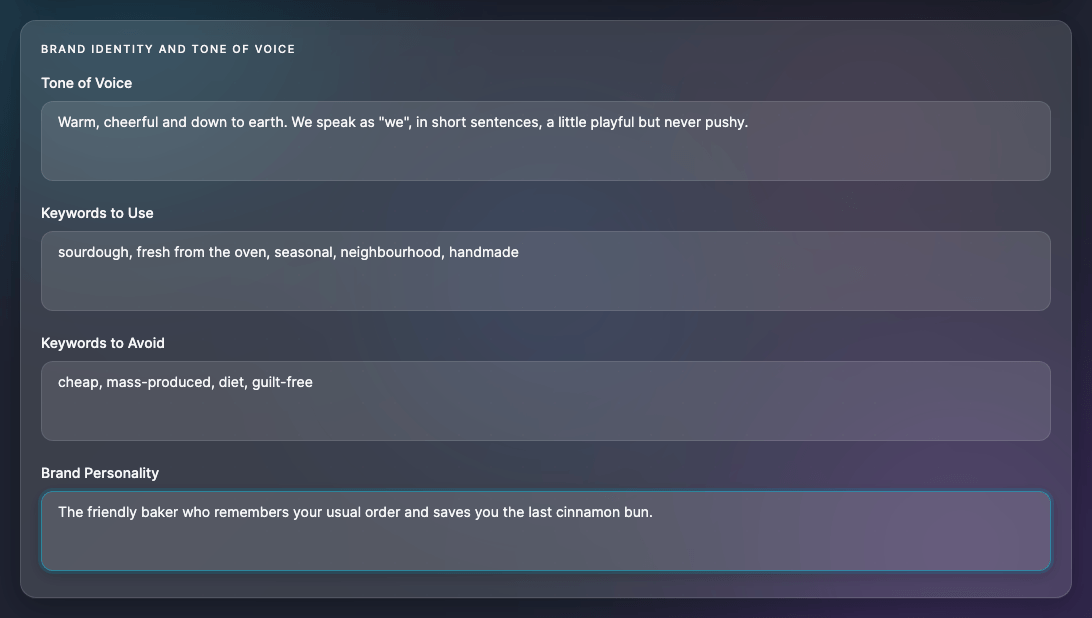
Brand identity and tone of voice
Tone of voice, brand personality, keywords to use and keywords to avoid. If you only fill in one section, make it this one: every caption Juls writes follows it.
Save the profile
Select the save button at the bottom of the tab. Nothing is stored until you save — switching tabs keeps your edits, but leaving the page doesn't.
Clearing the personalization deletes every field and uploaded document for that client, and can't be undone.
Language and voice
On the Basic information tab, two settings shape everything Juls writes for the client:
- Content language — posts, hashtags and plans are written in this language (English, Italian, Spanish, French or German).
- Voice preference — first or third person, singular or plural ("I", "we", or the business spoken about by name).
The additional notes field is read by Juls too: use it for anything that doesn't fit elsewhere.
Brand colour
Choose the client's brand colour on the Basic information tab of the edit page. It's used for the client's visual elements and on their review pages.
Good to know
The logo your clients see on review pages, reports and emails is your own, not theirs. Upload it in Settings → Logos — see Brand your workspace.
Import past posts
On the Post History tab, import the client's recent posts from their connected accounts. Juls uses them to avoid repeating topics the client has already covered.
- Choose the networks to import from, then start the import. Nothing changes on the networks.
- The import runs once per client. To redo it, clear the imported posts first; you can clear and re-import once every 24 hours.
- LinkedIn only lets Julexis read posts from Company Pages, not from personal profiles.